
Every piezo haptic driver does the same job: amplify the voltage from the power source and send waveforms to the actuator. They do not do it equally well. Most are built on audio amplifier architectures, which produce clean waveforms but draw a lot of power and generate heat, and that has held piezo haptics back in exactly the battery-powered devices where it should win. This article is part three of our three-part Haptic Technologies Showdown, and it compares the CapDrive® architecture against competing piezo ICs on power consumption, response time, footprint, waveform quality and integrated force sensing.
Key Takeaways
- All piezo drivers amplify voltage and send waveforms, but they differ sharply in power draw, response time, footprint and whether they can sense force at all.
- Most piezo drivers are built on audio amplifier architectures. They produce clean waveforms but consume significant power and generate heat, which is a poor match for mobile devices.
- CapDrive® consumes up to 10 times less power than competing piezo drivers. It was developed by Simon Chaput during his electrical engineering PhD at Harvard University.
- The BOS1921 comes in a WLCSP measuring 2.1 x 1.7 mm, with few external components, so the driver fits designs where board area is the binding constraint.
- CapDrive® is the only low-power piezo driver architecture that both drives an actuator and senses force through that same actuator, which removes the separate sensing hardware from a button design.
- Start your selection from the actuator, not the driver. Larger actuators need higher voltage, and a mobile device and a car sit at opposite ends of the power and space constraints.
Haptics are entering a new era thanks to better-performing technologies like piezo. Piezo haptics are not new by any means, but they perform better than ever because piezo driver integrated circuits have improved. As you will see, not all piezo drivers perform the same.
A piezo driver's role is to amplify the voltage from the power source and send waveforms to the piezo actuator, creating movement and tactile feedback. Adoption of piezo haptics was limited for years by the high power consumption of the available driver ICs. That changed with the release of our BOS1901 piezo driver IC built on CapDrive® technology.
Here is how we compare with the competition, and how to choose the right piezo haptic driver for your application.

Multiple Voltage Piezo Integrated Circuits for Your Application
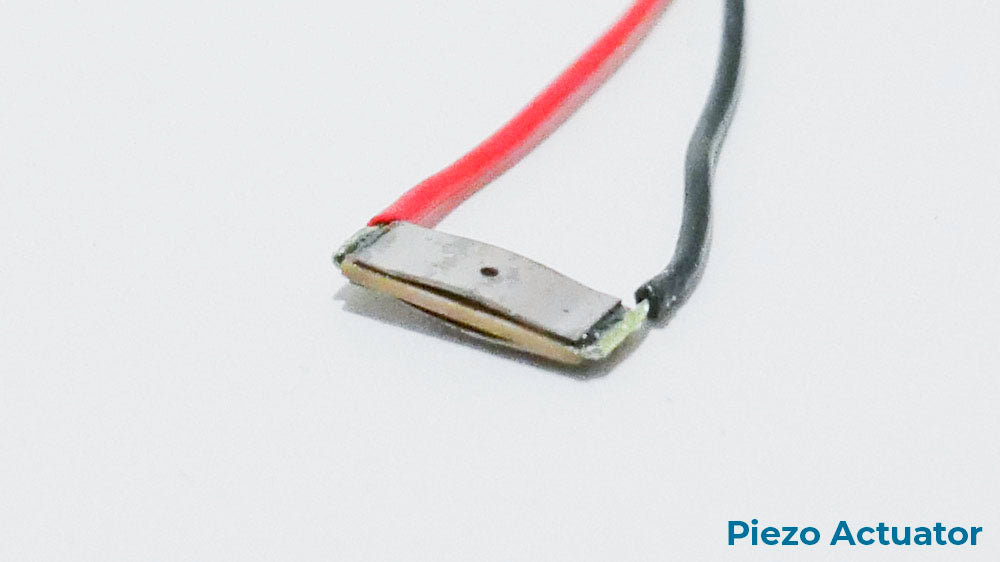
The first thing you need to know when selecting a piezo driver is the voltage your actuator requires. Generally speaking, larger piezo actuators need higher voltage to create haptic feedback. Your application has its own haptic requirements alongside power and space constraints, so the actuator has to fit those first.
A mobile device, with its low weight, tight space and limited power source, does not need the strongest piezo actuator to produce good tactile feedback. A car is the opposite case: space and power are not major constraints, but the feedback has to be strong enough to be felt over road vibration.
Once you have selected your actuator, you can start looking for the matching driver.
Lower Power Consumption for Better Battery Life
High power consumption held piezo haptics back for years, until CapDrive® technology.
Because a piezo driver has to amplify voltage and generate waveforms, early drivers were built on architectures borrowed from the audio industry. That approach produces high-quality waveforms, but it consumes a lot of power and generates a great deal of heat. Neither suits mobile devices, which are both one of the fastest-growing markets and one of the main applications for haptics.
CapDrive® takes a different approach. It is a piezo haptic driver architecture that consumes up to 10 times less power than the competition, developed by Simon Chaput while completing his PhD in electrical engineering at Harvard University. You can read more about CapDrive® technology here.
If you are integrating piezo haptics into a power-limited device such as a battery-powered mobile product, that difference is the reason to look at our drivers.
Faster Response Time for Better Tactile Effects
Haptic feedback needs precise timing to feel right. Piezo can create a wide range of distinct effects thanks to its very large frequency bandwidth, but realizing that range takes a driver that reacts as quickly as possible.
Piezo actuators themselves are near-instantaneous. The TDK PowerHap™ line, for example, specifies a reaction time of less than 2 milliseconds. That makes the driver the limiting factor if you want the fastest possible response, and our drivers are built for it: the BOS1921 has a start-up time of less than 300 µs.
Smallest Footprint to Save Board Space
The space available in your device will shape your driver choice, and our drivers are designed for tight ones. The BOS1921 comes in a WLCSP measuring just 2.1 x 1.7 mm, which puts the driver in the space-constrained designs where a haptic solution would otherwise not fit at all.
Few external components are required, which keeps both the bill of materials and the total solution area down.
CapDrive® Exclusive: Force Sensing to Lower BOM and Save Space
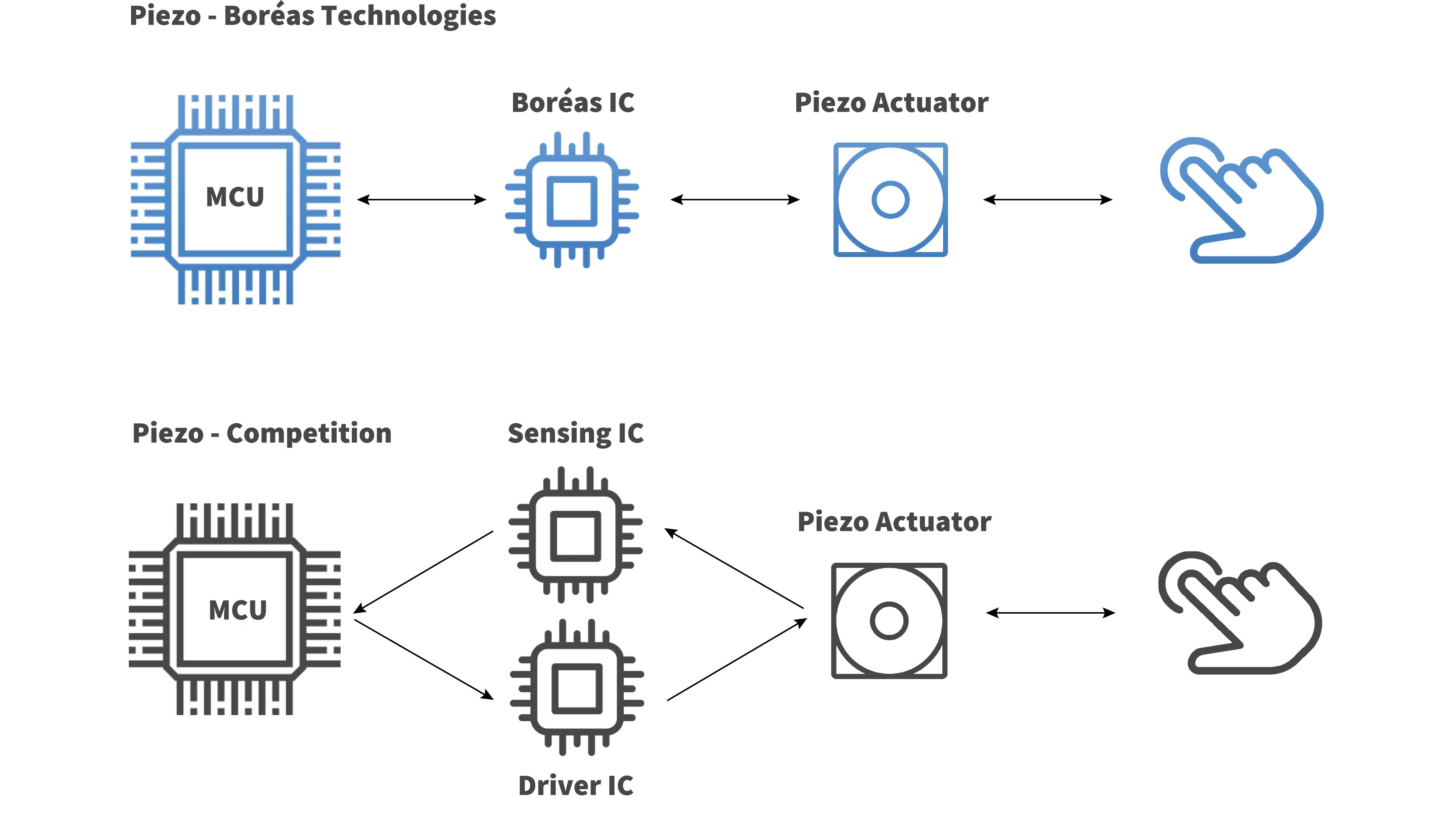
Low power consumption is not the only advantage of CapDrive®. It is also the only low-power piezo driver architecture that can both send waveforms to an actuator and sense force from that same actuator.
So if your application triggers feedback when force is applied, as replacing a mechanical button does, you can eliminate the sensing hardware and rely on a single piezo actuator paired with one of our drivers. That removes parts from the bill of materials as well as space from the board.
Clean Waveform Output for High-Definition Haptic Feedback
A piezo actuator works like an audio speaker. You need the cleanest possible output from the amplifier to get the clearest sound, and the same holds for haptics: the cleanest output from the driver produces the best feedback.
Noisy output produces unwanted vibration. That degrades the effect you actually designed, because the user feels the artifacts alongside it. Getting high-definition haptics out of a piezo actuator takes a driver with a clean output stage.
Boréas Technologies' Piezo IC CapDrive® Technology vs Competing Piezo ICs
| Features | Piezo - Competition | Piezo - CapDrive® |
| Acceleration (g)* | 2.5 | 2.5 |
| Power Consumption | Medium | Low |
| Start-Up Time [ms] | 1.5 | 0.3 |
| Footprint Size | Small | Miniature |
| Integrated Force Sensing | No | Yes |
| HD Haptics | Yes | Yes |
*with 100 g mass. Acceleration relates to feedback strength: a higher number means stronger feedback.
Experiment with Piezo Haptics Today
A BOS1921 development kit is available to test what piezo haptics can do. It comes with a selection of piezo actuators and GUI software so you can launch tactile effects within minutes.

Frequently asked questions
What does a piezo haptic driver actually do?
Two things. It amplifies the voltage from your power source up to the high voltage a piezo actuator needs, and it generates the waveform that tells the actuator how to move. The actuator determines what is physically possible; the driver determines how much of that you actually get, and at what power cost.
Why do most piezo drivers consume so much power?
Because of what their architecture is based on. Amplifying voltage and generating waveforms is what audio amplifiers do, so most piezo drivers are built on audio amplifier architectures. That approach produces clean waveforms, but it also means significant power draw and waste heat, which is a poor fit for the battery-powered devices where haptics matters most.
What is CapDrive® and who developed it?
CapDrive® is Boréas' piezo driver architecture, which recovers the energy stored in the actuator's capacitance rather than dissipating it, consuming up to 10 times less power than competing piezo drivers. It was developed by Simon Chaput during his PhD in electrical engineering at Harvard University, and it is the basis for the BOS1901 and the BOS1921.
How do I choose the right voltage for my piezo driver?
Start from the actuator, not the driver. Larger piezo actuators need higher voltage to produce feedback, and the actuator you can use is set by your application's space and power constraints. A mobile device has tight space, low weight and a limited battery, so it does not need the strongest actuator. A car has room and power, but the feedback has to be strong enough to be felt over road vibration. Pick the actuator for the application, then find a driver that matches its voltage.
How small is a piezo haptic driver?
The BOS1921 comes in a WLCSP measuring 2.1 x 1.7 mm. At that size the driver stops being a board-space problem, which matters in the designs where haptics is usually the first thing cut: wearables, glasses temples, and any product where the enclosure is the binding constraint. It also needs few external components, so the total solution area and the bill of materials stay small alongside the package itself.
Why does waveform cleanliness matter in a piezo driver?
Because a piezo actuator behaves like a speaker: it reproduces whatever the amplifier sends it, including the flaws. A noisy driver output produces unwanted vibration on top of the effect you designed, and the user feels both. Clean output is what separates a defined, intentional sensation from one with artifacts around it.
Which piezo drivers can sense force as well as drive the actuator?
CapDrive®-based drivers are the only low-power piezo architecture that does both through the same actuator. Because the piezoelectric effect is reversible, pressing the actuator generates a measurable voltage, and a CapDrive® driver reads it. For any application where feedback is triggered by a press, such as a solid-state button, that removes an entire force-sensing subsystem from the bill of materials.
Glossary
Piezo driver: The integrated circuit that amplifies a low-voltage power source to the high voltage a piezo actuator needs, and generates the waveform it plays.
CapDrive®: Boréas' piezo driver architecture, which recovers energy from the actuator's capacitance on every cycle to deliver high-definition haptics at low power, with integrated force sensing.
WLCSP package: Wafer-Level Chip-Scale Package, where the package is essentially the die itself. The BOS1921 WLCSP measures 2.1 x 1.7 mm.
Discrete components: The external parts a driver needs around it to operate. Fewer discrete components means a smaller total solution footprint and a lower bill of materials.
Waveform: The electrical signal a driver sends to the actuator, which determines the shape and character of the tactile effect.
Start-up time: How long the driver takes to be ready to play an effect after it is triggered. The BOS1921 starts in less than 300 µs.
HD haptics: High-definition tactile feedback, meaning effects with enough bandwidth and speed to be felt as distinct sensations rather than one generic vibration.
Integrated force sensing: A driver's ability to detect how hard a surface is pressed through the same actuator that produces the feedback, removing the need for a separate sensor.
Bill of materials (BOM): The full list of parts in a product. Removing a force-sensing subsystem lowers both BOM cost and board area.
Related reading
Haptic Technologies Showdown, part 1: Boréas' Piezo Driver IC vs. Eccentric Rotating Mass (ERM)
Piezo vs LRA: How Linear Resonant Actuators Compare to Piezo Haptics (Showdown, part 2)
How to Select the Right Haptic Piezo Driver and Actuator Combination
How to Choose a Haptic Actuator: Piezo vs LRA vs ERM
Mechanical Fundamentals of Piezo Haptic Actuators
Boréas Blueprint: piezo integration engineering
Next steps
Review the CapDrive® piezo driver architecture → https://www.boreas.ca/pages/capdrive-technology
See the BOS1921 piezo driver specifications → https://www.boreas.ca/collections/piezo-haptic-drivers/products/bos1921-piezo-driver
Prototype piezo feedback with a development kit → https://www.boreas.ca/products/bos1921-kit-c01
Get integration help through the Boréas Blueprint → https://www.boreas.ca/pages/boreas-blueprint-engineering
Compare driver options with our applications engineering team → sales@boreas.ca
Leave a comment