
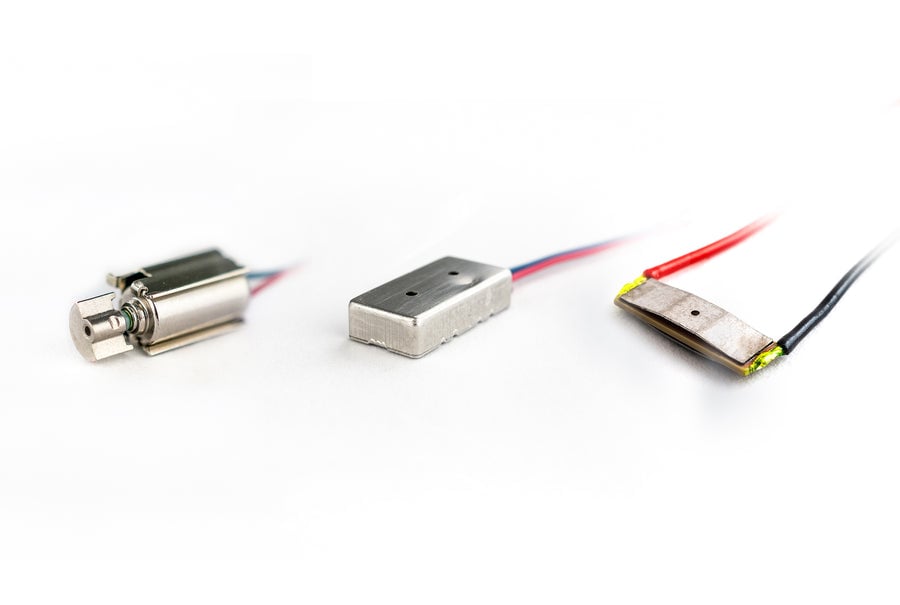
A haptic actuator is an electromechanical component that converts an electrical signal into tactile feedback. Three types dominate device design: eccentric rotating mass (ERM), linear resonant actuators (LRA), and piezoelectric actuators. They differ in response time, frequency bandwidth, power draw, and integration complexity — factors that determine which suits a given product.
This guide compares the three actuator types on the criteria that matter for product design, then explains where each fits and how to choose for your application.
Key takeaways
- Three actuator generations dominate haptics: ERM (1st), LRA (2nd), and piezoelectric (3rd).
- Piezo actuators cover the full haptic bandwidth (1–400 Hz); LRA is limited to a narrow resonant band of about ±5 Hz.
- Piezo has a short start/stop time that enables sharp clicks; LRA start/stop exceeds 20 ms, producing a "buzz."
- A piezo actuator paired with a Boréas CapDrive® driver uses up to 90% less power than legacy piezo drivers.
- Piezo requires a higher driving voltage than ERM or LRA — its main integration trade-off.
1. What is a haptic actuator?
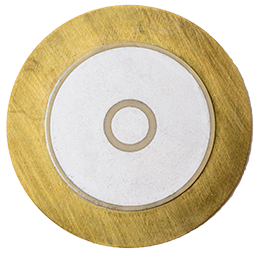
A haptic actuator is an electromechanical component that converts an electrical signal into mechanical motion to produce tactile feedback. Devices use haptic actuators to confirm a touch, simulate a button press, or render texture and alerts the user can feel.
Haptic actuators are commonly grouped into three generations. The first, the eccentric rotating mass (ERM), spins an off-centred weight to create vibration. The second, the linear resonant actuator (LRA), moves a spring-mounted mass along a single axis near its resonant frequency. The third, the piezoelectric actuator, exploits the piezoelectric effect: certain materials deform when a voltage is applied, generating motion with no moving mass. Each generation improved on the previous one's response time and feedback precision, a progression documented across the field of haptic technology.
Glossary
- Resonant frequency: the single frequency at which an LRA vibrates most efficiently. (Reference)
- Haptic bandwidth: the range of frequencies — roughly 1–400 Hz — that the human fingertip perceives as distinct tactile feedback.
- Response time (start/stop): how quickly an actuator reaches peak output and then stops; it determines whether feedback feels like a sharp click or a lingering buzz.
- Piezoelectric effect: the property by which certain materials change shape when an electric field is applied.
2. Haptic actuators compared: ERM vs LRA vs piezo

The three actuator types differ on six criteria that shape industrial design, battery life, and feedback quality.
| Criterion | Gen 1: ERM | Gen 2: LRA | Gen 3: Piezo |
|---|---|---|---|
| Actuator size | Large | Medium (placed near the button) | Small / thin (localized under the button) |
| Response time (start/stop) | Long | Medium | Very fast |
| Frequency bandwidth | Wide, but linked to amplitude | Narrow | Widest (1–400 Hz) |
| Power consumption | High | Medium | Low (when driven by a CapDrive® driver) |
| Driving voltage | Low | Low | High |
| Integrated sensing | No (separate component) | No (separate component) | Yes |
Three differences drive most design decisions:
Frequency bandwidth. An LRA behaves like a piano with one or two keys — it is efficient only within about ±5 Hz of its resonant frequency before its amplitude drops sharply. An ERM's amplitude is tied to its frequency, so the two cannot be controlled independently. A piezo actuator operates across the full haptic bandwidth (1–400 Hz), giving designers independent control over frequency and amplitude.
Response time and sharpness. An LRA's start and stop times exceed 20 ms, which the finger perceives as a buzz. A piezo actuator starts and stops within a few milliseconds, producing a crisp, well-defined click. There is nothing wrong with a buzz — until the design calls for a sharp click, which an LRA cannot deliver.
Complex effects. An LRA is restricted to a sinusoidal oscillatory waveform. A piezo actuator can reproduce arbitrary waveforms, opening a far wider library of tactile effects.
The clear trade-off is in the table's last two rows: a piezo actuator requires a higher driving voltage than an ERM or LRA, which means it needs a dedicated driver IC. That added component is the cost of admission for piezo's bandwidth, speed, and integrated sensing.
3. How CapDrive® and the BOS1921 address the piezo trade-offs
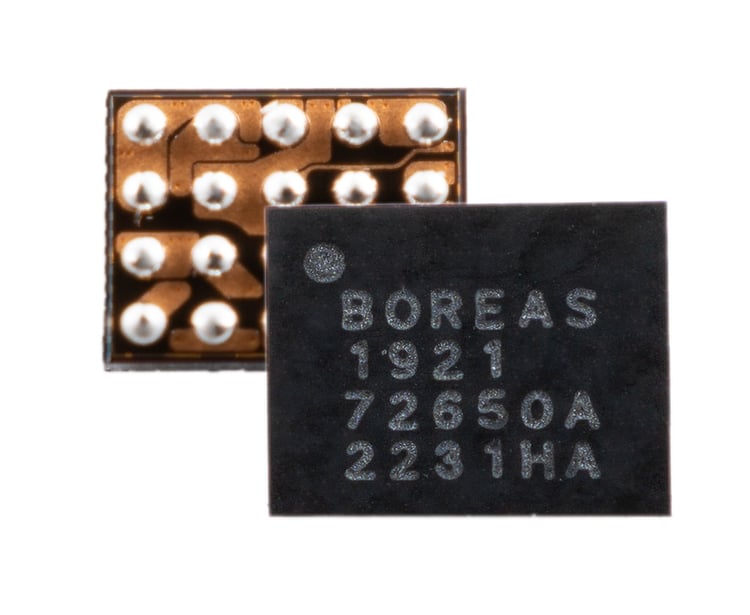
The two historical objections to piezo — high driving voltage and the resulting power draw — are the problems a purpose-built driver solves. This is where Boréas Technologies' CapDrive® technology and the BOS1921 driver IC come in.
Energy recovery and power efficiency
CapDrive® recycles the energy stored in the actuator's capacitance on every click. By recovering that charge rather than dissipating it, CapDrive® reduces power consumption by up to 90% (roughly 10×) compared with legacy piezo drivers. This is a comparison against other piezo drivers, not against ERM or LRA — and it matters, because a piezo actuator driven by an inefficient driver can consume more power than an LRA. The efficiency comes from the driver, not the actuator alone. ([VERIFY: confirm "legacy piezo drivers" wording and that 90% is the publishable figure. TK: state methodology — sample and measurement conditions — so the claim is falsifiable.])
That efficiency lets manufacturers add high-definition haptics to battery-constrained devices without compromising runtime.
Integrated force sensing
Unlike ERM and LRA, which require a separate sensing component, the BOS1921 combines drive and force sensing on a single IC. The same device that produces feedback also senses the user's press, enabling closed-loop solid-state buttons with no mechanical switch.
Fast start-up
The BOS1921 has a start-up time of under 300 µs ([VERIFY]), short enough to fire haptic effects with no perceptible latency between touch and response.
Anchor product: the BOS1921 pairs CapDrive® efficiency with integrated sensing, making it suited to compact, battery-powered designs.
Boréas led the full design process for the haptic trackpads in the Dell XPS 13 and Latitude 9440, taking a piezo solution to mass-market scale — evidence that piezo's bandwidth, thinness, and uniformity advantages hold up in volume production, not just in prototypes.
4. Which actuator fits which application?

The right actuator depends on what the interaction needs to do, not on specs in isolation. The fingertip has roughly twice the nerve fiber density of the palm, so feedback quality matters most precisely where a user touches a control — which raises the bar for any surface meant to feel premium.
For a single, simple alert — an LRA is a great fit. If a device only needs to confirm a notification or a basic button tap with one consistent vibration, an LRA delivers that cleanly and at low cost. Reaching for piezo here adds expense and mechanical complexity for no perceptible benefit.
For a multifunction control surface — piezo is where the technology earns its place. Consider a dedicated control like the camera button Apple introduced on recent iPhones: a single physical location that must render several distinct sensations to signal different actions — a light press, a full press, a swipe. That layered, multi-effect feedback is beyond an LRA's narrow resonant band and single waveform. Apple's implementation is not piezo, and it already surpasses what an LRA can do — but it illustrates the ceiling that only a piezo actuator clears, with its full 1–400 Hz bandwidth and arbitrary waveforms.
The decision rule is simple: if you need one notification, an LRA is enough; if you want to build a richer human-machine interface (HMI) around a surface, piezo is the technology that makes it possible.
5. Frequently asked questions
Piezo vs ERM vs LRA — which is best for my use case?
Piezo is best when you need sharp, precise feedback, a wide frequency range, or a thin actuator localized under a surface — such as solid-state buttons. LRA suits simple, low-cost click and alert feedback. ERM fits basic vibration alerts where cost outweighs feedback quality.
Why does my piezo haptic feel weak or bad?
A weak or distorted piezo effect usually points to the driver or the waveform, not the actuator. An underpowered driver, a waveform that demands more power than the driver can deliver, or a poorly tuned amplitude and frequency all degrade the feel. Reviewing driver settings and waveform design typically resolves it.
How long does it take to integrate piezo haptics into a product?
The electronics are quick; the mechanical design is the real timeline. Getting the structural integration right — stiffness, mounting, and how vibration reaches the finger — can take more than six months. Boréas offers the Blueprint co-development program to compress that mechanical, electrical, and software work and de-risk the path to production.
What is the best haptic feedback technology for wearables and AR glasses?
Piezo is well suited to wearables and AR glasses because the actuator is small and thin, the power draw is low when paired with an efficient driver, and feedback can be localized. Space and battery constraints in head-worn and wrist-worn devices favor piezo over bulkier ERM or LRA motors.
Do piezo actuators use more power than LRA or ERM?
Not when paired with an efficient driver. A piezo actuator driven by a legacy driver can consume more power than an LRA, but a CapDrive®-based driver recovers energy from the actuator's capacitance, cutting consumption by up to 90% versus legacy piezo drivers. The driver, not the actuator, determines efficiency.
Can piezo replace LRA and ERM in existing designs?
Yes, but it means rethinking the mechanical integration, not just swapping the part. That effort is not worth it if you only need a simple notification. Piezo pays off when the goal is a better human-machine interface — sharp, localized, multi-effect feedback — rather than a basic alert.
6. Related reading
- Different types of haptic feedback and their applications
- How to select the right haptic piezo driver and actuator combination
- Mechanical fundamentals of piezo haptic actuators
- Solid-state piezo haptic buttons
- Boréas Blueprint — piezo integration engineering
7. Next steps
Evaluate piezo feedback for your own design. The Piezo Solid-State Button Devkit with CapTouch lets you prototype sharp, localized button feedback with the BOS1921 and tune effects before committing to hardware.
→ Piezo Solid-State Button Devkit with CapTouch
Author
Marc-André Morin, Boréas Technologies.
Leave a comment