
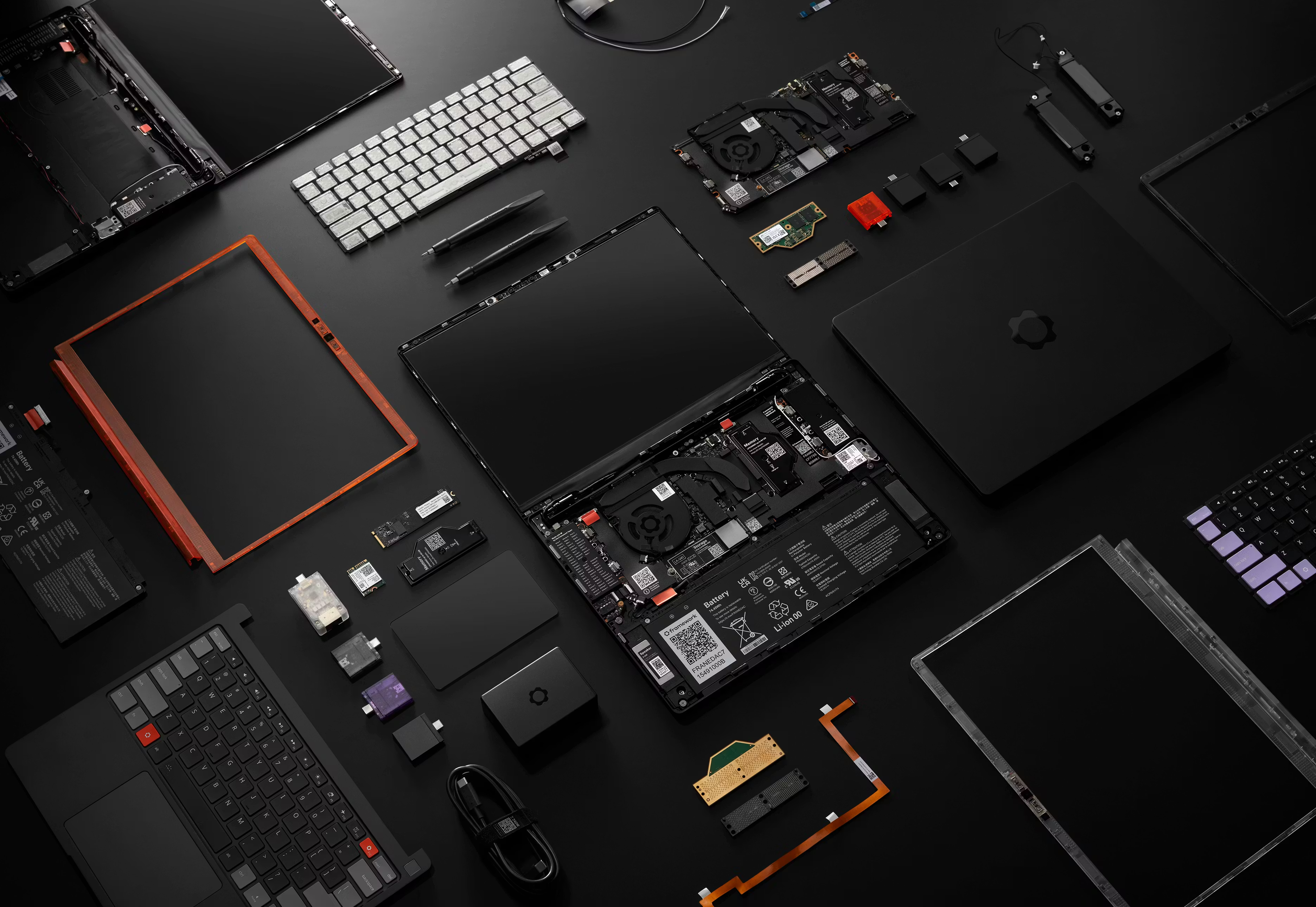
Framework announced on April 21, 2026 that its Laptop 13 Pro ships with a haptic trackpad built around four piezoelectric discs and a single BOS1921 driver IC from Boréas Technologies. The trackpad has no mechanical hinge, and independent reviews from The Verge, Engadget, and Tom's Hardware all singled it out as the first Windows touchpad that feels like it belongs next to a MacBook.
Key Takeaways
- One Boréas BOS1921 IC drives all four piezo discs in the Framework Laptop 13 Pro trackpad in parallel, announced April 21, 2026.
- A separate capacitive (captouch) layer tracks finger position; the piezo discs only measure force and produce the click.
- The full trackpad module comes in under 3 mm thick, with no mechanical hinge to add height.
- Each piezo disc deflects only a few microns per click, enough to convince your finger the whole surface moved.
- Reviewers at The Verge, Engadget, and Tom's Hardware all compared the feel directly to a MacBook trackpad, a first for a Windows laptop.
- Boréas engineered the calibration equipment Lite-On uses to tune every unit on the assembly line, an approach it calls the Boréas Blueprint.
What makes this trackpad different from every other Windows laptop
Most Windows trackpads still hinge along the top edge. Press near the hinge and the click feels tight. Press near the bottom, farther from the pivot, and it takes noticeably more force. That inconsistency is a mechanical limitation, not a software one, and it's one reason Windows trackpads have had a reputation problem next to Apple's for over a decade.
The Framework Laptop 13 Pro removes the hinge entirely. Four piezoelectric discs sit under the trackpad surface and generate the click, all driven by a single Boréas BOS1921 IC. Because there's no pivot point, the click feels the same whether your finger lands at the top of the pad or the bottom corner.

One driver, four discs, and how the click actually works
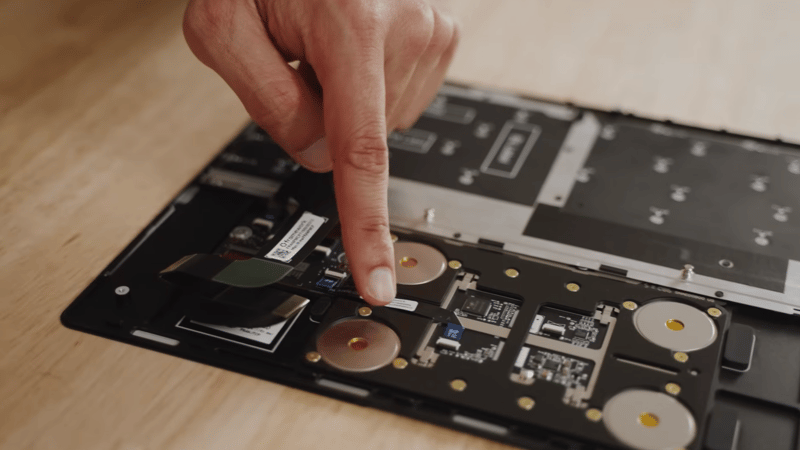
The BOS1921 doesn't move a mass to generate the click. It drives all four piezo discs in parallel with a high-voltage waveform that bends each one by only a few microns, and that tiny, synchronized deflection is enough to convince your finger the whole surface moved.
Position and force are handled separately. A capacitive sensing layer, the same underlying technology as a phone touchscreen, tracks where your finger is on the pad. The piezo discs measure how hard you're pressing and generate the feedback, but they don't do the tracking. That split is also why the design needs no extra height: the whole module, discs, driver, and capacitive layer together, comes in under 3 mm.
Framework CEO Nirav Patel credited the tuning work behind the feel: "We put a ton of work into tuning this with our partners Lite-On and Boréas... working to make this the best feeling Windows and Linux touchpad." Boréas CEO Simon Chaput called the launch a validation of the technology outside the smartphone and automotive markets it started in: "Seeing our drivers ship inside such an ambitious product is a strong endorsement."
What reviewers are saying, including the one thing they flagged
The Verge, Engadget, and Tom's Hardware all reviewed the Laptop 13 Pro after launch, and the trackpad came up in every one of them as the biggest surprise.
Engadget put it plainly: "I'm a big fan of the haptic touchpad, which really does feel like it came from a MacBook." The review also credited the work behind it directly: "The company says it spent a lot of time working on this component in order to make a Windows/Linux laptop with a touchpad that rivals those found on the MacBook." (Engadget, Framework Laptop 13 Pro review)
Tom's Hardware agreed it was "a huge step up from the company's mechanical touchpads, which often felt cheap," but flagged two rough edges: minor cosmetic flex in the keyboard deck under the trackpad during heavy use, and a side effect where the haptic actuators picked up vibration from music played through the laptop's speakers. Neither affected clicking or gesture accuracy during testing. (Tom's Hardware, Framework Laptop 13 Pro review)
The Verge went further: "This is the best non-Apple haptic trackpad I've ever used. It's very responsive to 'clicks' from corner to corner, and it feels and sounds just right." (The Verge, Framework Laptop 13 Pro review)
Mechanical hinge vs. piezo haptic trackpad
| Mechanical hinge trackpad | Piezo haptic trackpad (BOS1921) | |
|---|---|---|
| Click force across the surface | Varies with distance from the hinge | Consistent edge to edge |
| Finger position sensing | Usually capacitive | Capacitive layer, separate from the piezo discs |
| Force sensing | Needs a dedicated sensor, or none at all | Built into the piezo discs that also produce the click |
| Module thickness | Limited by hinge travel and switch height | Under 3 mm in this design |
| Feedback tuning | Fixed by the mechanism | Adjustable waveform, amplitude, and rise time in firmware |
| Moving parts | Hinge, switch, sometimes a separate Force Touch stack | Piezo discs only, no pivot |
Programmable clicks are the real unlock for Windows UX
A mechanical hinge only ever does one thing: click. A piezo trackpad's feedback is a waveform, which means it can be shaped. Boréas builds that tuning into HapticStudio, its waveform design software, so a laptop maker's own UX team can experiment with rise time, amplitude, and frequency without needing haptics expertise of their own.
That matters more than the trackpad feeling good on day one. If Windows OEMs start treating click feel as something they can design around, the same four-disc, one-driver architecture behind the 13 Pro can support use cases a mechanical hinge simply can't: different click weights for different apps, a distinct feel for a drag versus a tap, or trackpad regions that behave differently depending on context.
The Boréas Blueprint: what it took to get this trackpad into production
A single driver IC and four piezo discs is a simple bill of materials. Getting every unit off Lite-On's assembly line to click the same way is the hard part, and that gap is what the Boréas Blueprint is built to close.
Each unit needs its own calibration so the four piezo discs know exactly how hard to actuate depending on where on the surface your finger lands. Without that calibration, the trackpad doesn't work at all. So Boréas didn't stop at supplying the BOS1921. Its engineers designed the calibration equipment that now runs on Lite-On's line to tune every trackpad before it ships, and its software team wrote the firmware behind the pad, including palm rejection and click rate tuned specifically for this use case, plus the calibration tool the line uses to run it.
Boréas has run this same playbook before, managing the design and production support for Dell's XPS 13 and Latitude 9440 piezo trackpads. But production support sometimes means more than a checklist. At one point in the Framework program, Boréas put an engineer on a plane to Asia for two weeks to work the line directly with Lite-On. It saved weeks of the back-and-forth that would otherwise have played out over email.

Frequently asked questions
What actuator does the Framework Laptop 13 Pro trackpad use?
It uses four piezoelectric discs mounted under the trackpad surface, all driven in parallel by a single Boréas BOS1921 IC that generates the high-voltage waveform behind each click.
If the piezo discs measure force, how does the trackpad know where my finger is?
A separate capacitive sensing layer, the same underlying technology used in phone touchscreens, tracks finger position. The piezo discs only measure how hard you're pressing and generate the click; they don't handle position tracking.
How is a piezo haptic trackpad different from a mechanical hinge trackpad?
A mechanical trackpad pivots on a hinge, so click force changes depending on where you press. A piezo trackpad has no hinge: four piezo discs under the surface generate the click directly, so the feel stays consistent across the entire pad.
Is a piezo haptic trackpad thinner than a mechanical one?
It can be. The Framework Laptop 13 Pro's full trackpad module, piezo discs, driver, and capacitive layer combined, comes in under 3 mm, since the design doesn't need the vertical travel a mechanical hinge and switch require.
What is the Boréas Blueprint?
The Boréas Blueprint is Boréas' co-development process for getting a piezo haptic design from prototype to mass production, covering electrical, mechanical, and software integration plus on-site calibration support during manufacturing, the same process used on the Framework 13 Pro and on Dell's XPS 13 and Latitude 9440 trackpads.
Glossary
Piezoelectric actuator — A component that deforms slightly when a voltage is applied across it, used here to produce the click a user feels under a trackpad.
Haptic driver IC — The chip that generates the voltage waveform sent to a piezo actuator, controlling the strength, shape, and timing of the feedback.
CapDrive — Boréas' patented piezo driver architecture that recovers energy from the actuator on each cycle instead of dissipating it, reducing power draw.
Captouch — Capacitive touch sensing, the same technology behind phone touchscreens, used here to track finger position on the trackpad separately from the piezo discs that produce the click.
Boréas Blueprint — Boréas' co-development framework for taking a piezo haptic design from concept to mass production, including electrical and mechanical integration, firmware, and on-site manufacturing calibration support.
Related reading
- Boréas Blueprint — how Boréas takes a piezo haptic design from prototype to mass production
- Piezo Haptic Trackpads — Boréas' solution page for laptop and peripheral trackpad designs
- Understanding Haptic Trackpad Architecture in Next-Gen Laptops
- Piezo vs. LRA Haptic Computer Trackpads: Which Technology Should You Select
- What Is CapDrive? The Piezo Driver That Recovers Energy on Every Actuation
Next steps
- Read how the Boréas Blueprint takes a design like this one from prototype to a calibrated production line.
- Review the Piezo Haptic Trackpad solution page for module specs and BOS1921 selection guidance.
- Talk to Boréas engineering about applying the same integration approach used on the 13 Pro to your own trackpad or button design: info@boreas.ca.
Marc-André Morin, Marketing, Communications & Distribution — Boréas Technologies.
Leave a comment